How Long Does It Take for Tax Refund to Go Into Bank: HMRC Timelines, P800 Claims, and Clearance

Last Updated: October 26, 2026
Waiting for a tax refund can be frustrating, particularly when HMRC has confirmed that money is owed but nothing has appeared in your bank account.
So, how long does it take for a tax refund to go into your bank?
For many PAYE taxpayers claiming a P800 refund online, HMRC says the money should be sent within 5 working days.
Self Assessment refunds can take longer because the repayment may first need to be processed, checked and authorised before the bank transfer is issued.
The total waiting time therefore depends on the type of refund, how the claim was made, whether HMRC needs additional checks and whether the repayment has already been authorised.
In 2026, HMRC said it was reviewing around 45 million PAYE accounts, with P800 reconciliation continuing through November.
Customers identified as having overpaid tax can claim eligible refunds through GOV.UK or the HMRC app.
When Can You Expect an HMRC Refund in Your Account?
There is no single refund timeframe that applies to every HMRC repayment.
The important distinction is between HMRC processing the refund and the payment reaching your bank.
For a straightforward P800 refund claimed online, HMRC says the money will be sent within 5 working days.
A Self Assessment refund may spend additional time being reviewed before it reaches the authorised stage.
Once a Self Assessment repayment has been authorised, HMRC’s internal guidance says the repayment system should issue it within three days and the taxpayer should normally receive it within around five days, although BACS processing can make the final bank arrival slightly longer.
If you are still waiting for HMRC to calculate whether you have overpaid through PAYE, the timing is different.
You can check when HMRC is likely to send your P800 before assuming a repayment has already been created.
HMRC Tax Refund Times By Refund Type
Different refund routes have different expected processing periods.
| Refund Type | Typical HMRC Timeframe |
| P800 Refund Claimed Online | Money sent within 5 working days |
| P800 Cheque Requested From HMRC | Up to 6 weeks |
| Automatic P800 Cheque | Normally within 14 days of the letter date where the letter says HMRC will automatically send one |
| Self Assessment Refund After Authorisation | Normally received within around 5 days, although BACS may take slightly longer |
| VAT Repayment | Usually within 30 days of HMRC receiving the VAT Return |
These periods should not be treated as guarantees for every case. Additional checks, inaccurate information or repayment verification can extend the process.
P800 And PAYE Tax Refund
A P800 is normally issued when HMRC’s PAYE records show that an employee or pension recipient has paid too much or too little Income Tax.
If your P800 says you can claim the refund online, you can normally claim using GOV.UK, your Personal Tax Account or the HMRC app.
HMRC states that online P800 repayments are sent within 5 working days.
If you request a cheque instead, HMRC says it can take up to 6 weeks.
Some P800 letters state that HMRC will automatically issue a cheque. In that situation, GOV.UK says the cheque should arrive within 14 days from the date shown on the letter.
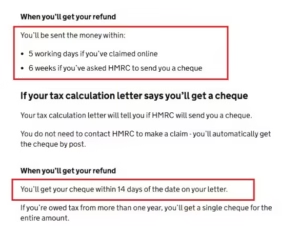
Official GOV.UK guidance confirms the 5-working-day online refund timeframe and the longer cheque repayment periods.
If the overpayment resulted from PAYE deductions, it is also worth checking whether your tax code contributed to the problem.
An incorrect code can result in excessive Income Tax deductions, so checking whether your tax code is correct can help explain why the refund arose.
Self Assessment Tax Refund
Self Assessment repayments work differently from P800 refunds.
Submitting a tax return showing an overpayment does not necessarily mean the money will immediately be released to your bank.
HMRC may first need to:
- Process The Return
- Confirm The Credit Balance
- Check The Repayment Request
- Carry Out Security Checks
- Authorise The Repayment
- Issue The Bank Payment
HMRC’s published Self Assessment guidance says a refund may show as pending in your online account. This means the repayment has been created but still needs to be approved and paid.
Once it has been authorised, HMRC’s internal repayment guidance says the taxpayer should normally receive the money within approximately five days, subject to BACS processing.
VAT Refund
Businesses expecting a VAT repayment should use a different timeframe.
HMRC says VAT repayments are usually made within 30 days of receiving the VAT Return.
If HMRC needs to check whether the VAT Return or repayment amount is correct, it can take longer.
Businesses can check VAT repayment progress through their Business Tax Account.
HMRC says businesses can contact it if the account has not been updated and no communication has been received within 30 days.
Refund By Cheque
Bank transfer is generally faster than waiting for a paper cheque.
For an eligible P800 refund:
- Online Refund – Normally sent within 5 working days
- Cheque Requested From HMRC – Allow up to 6 weeks
- Automatic P800 Cheque – Normally within 14 days where the P800 specifically says HMRC will send it automatically
Always follow the instructions shown on the P800 rather than assuming HMRC will automatically post a cheque.
HMRC Processing Time Vs Bank Transfer Time
One of the biggest causes of confusion is treating HMRC processing time and bank transfer time as the same thing.
They are separate stages.
A repayment can move through a process similar to:
Refund Requested → HMRC Checks → Refund Authorised → Payment Transmitted → Refund Issued → Bank Processes Payment → Money Reaches Account
HMRC uses several repayment statuses within the Self Assessment system.
A repayment marked Transmitted has been passed to HMRC’s repayment system but has not yet been issued. An Issued status means the repayment has been issued. A Rejected status can indicate that the BACS repayment has been rejected.
Therefore, somebody who submitted a refund request yesterday cannot necessarily count the bank-transfer period from that date.
The more useful question is whether HMRC has actually authorised and issued the repayment.
How Does the HMRC Tax Refund Process Work?
The exact process depends on whether the refund comes from PAYE, Self Assessment, VAT or another HMRC system, but Self Assessment repayments illustrate the main stages clearly.
Refund Pending
If your online Self Assessment account shows a refund as pending, HMRC says the repayment has been created but still needs to be approved and paid.
A pending repayment therefore does not necessarily indicate a problem.
HMRC may need to complete routine verification or additional checks before releasing the payment.
Refund Authorised
Authorisation is an important point in the repayment process.
HMRC’s Self Assessment manual explains that after a repayment is authorised, the information passes to the repayment system.
If no additional issues arise, HMRC says the repayment system should issue it within three days of authorisation.
Refund Issued
Once a repayment reaches Issued status, HMRC has issued the payment.
Its Self Assessment guidance indicates that the taxpayer should normally receive the repayment within around five days from authorisation, although the bank or building society’s processing can make a BACS payment take slightly longer.
If considerably more time has passed, check the repayment details and current HMRC processing information before submitting another request.
Why Is My HMRC Tax Refund Taking Longer Than Expected?
A refund taking longer than the standard timeframe does not automatically mean that it has been lost.
Several factors can delay repayment.
HMRC Security Checks
HMRC can carry out additional checks before releasing tax refunds.
These checks are particularly important where HMRC needs to confirm that a claim is genuine or that the amount being requested is correct.
HMRC may write to the taxpayer asking for additional information to verify a Self Assessment repayment claim.
Responding to such correspondence is important because HMRC may be unable to release the refund until the requested information has been supplied.
Incorrect Bank Details
Incorrect account details can prevent a BACS repayment from reaching its intended destination.
HMRC’s repayment system includes a Rejected status for BACS repayments that have been rejected by the banking system.
Check that the bank account:
- Is Still Open
- Can Receive UK Bank Transfers
- Has The Correct Sort Code
- Has The Correct Account Number
- Matches The Repayment Details Where Required
If the bank account has been closed or the payment has been rejected, HMRC may need to arrange repayment again.
Errors Or Missing Information
Incorrect or incomplete information can result in additional HMRC checks.
This can include problems with:
- Income Figures
- Tax Already Deducted
- Employment Records
- Pension Details
- Allowable Expenses
- Bank Details
- Self Assessment Information
PAYE overpayments can also arise because the wrong tax code was operated.
This is particularly common after changing jobs or where HMRC does not yet have complete employment information.
People placed temporarily on an emergency tax code can sometimes pay too much Income Tax before their PAYE record is corrected.
Outstanding Tax Owed To HMRC
Receiving a credit on your Self Assessment account does not always mean HMRC will transfer the whole amount to your bank.
GOV.UK states that you may not receive a refund where tax becomes due within the next 45 days, such as an upcoming payment on account. Instead, the credit can be used against the tax you are about to owe.
For example, if your account shows a £1,000 overpayment but a £900 Self Assessment payment is about to become due, the available repayment can be reduced.
How To Check Your HMRC Tax Refund Status?
The best way to check a refund depends on its type.
For PAYE refunds, taxpayers can use their Personal Tax Account or HMRC app to view relevant Income Tax information and determine whether a refund is available.
Self Assessment taxpayers can sign in to their online account and check the account balance and repayment information.
A status showing pending means the repayment has been created but still needs approval and payment.
HMRC also provides its Check When You Can Expect a Reply service. The information is updated weekly and covers areas including Income Tax, Self Assessment and VAT.
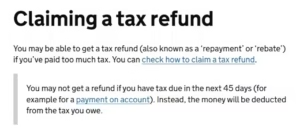
Official GOV.UK guidance confirms what a pending Self Assessment refund means and explains when an upcoming tax liability may affect repayment.
One important 2026 clarification concerns Self Assessment credits.
HMRC says that after submitting a return or online repayment request, the account can sometimes continue showing the amount simply as credit, even though the repayment request has been received and is already being processed.
If you received a submission reference, HMRC says another repayment request is not necessary and submitting a duplicate request will not make the process faster.
If you receive an unexpected message saying you are entitled to a refund, do not enter financial information through an unverified link.
Understanding whether a GOV.UK P800 refund is legitimate can help distinguish genuine HMRC correspondence from refund scams.
What Should You Do If Your HMRC Refund Has Not Arrived?
Start by identifying which stage of the refund process you have reached.
If you have only submitted the claim, HMRC may still be processing it.
If the repayment is pending, it still requires approval and payment.
If the repayment has already been issued and enough time has passed, check your bank details and whether the payment has been rejected or returned.
A sensible order is:
- Check Your HMRC Account
Confirm whether the refund appears as credit, pending or issued. - Find Your Submission Reference
For Self Assessment repayments, this can confirm that HMRC received the request. - Check The Expected HMRC Timeframe
Use GOV.UK’s current response-time service rather than relying on an old estimated processing period. - Check Your Bank Details
Make sure the account has not been closed or entered incorrectly. - Check For HMRC Correspondence
HMRC may have requested additional information or evidence. - Check Upcoming Tax Liabilities
A Self Assessment payment becoming due within 45 days can affect the amount refunded. - Contact HMRC When Appropriate
If the published processing period has passed and the issue remains unresolved, contact the relevant HMRC service.
Avoid repeatedly submitting the same repayment request. HMRC specifically warned in May 2026 that duplicate online repayment requests do not speed up an existing Self Assessment repayment.
Can HMRC Use Your Tax Refund To Pay Another Tax Bill?
Yes, in some circumstances.
Self Assessment refunds can be affected by amounts already owed or becoming due shortly.
GOV.UK states that if tax becomes due within the next 45 days, such as a payment on account, you may not receive the expected refund. The money can instead be deducted from the amount you owe.
HMRC’s Self Assessment manual also explains that where a return is processed within 45 days of a liability becoming due, the amount available for repayment can be reduced to cover that liability.
This is why the credit shown on an HMRC account does not always equal the amount ultimately transferred to the taxpayer’s bank.
How Far Back Can You Claim an HMRC Tax Refund?
The deadline depends on the type of refund and why the overpayment occurred.
For Self Assessment overpayment relief, GOV.UK says a claim can generally be made up to four years after the end of the tax year concerned.
For example, an overpayment relating to an older tax year should not automatically be assumed to remain claimable indefinitely.
Where the normal amendment period for a Self Assessment return has already passed, an overpayment relief claim may need to be made instead.
A valid overpayment relief claim should explain:
- The Relevant Tax Year
- Why Too Much Tax Was Paid
- The Amount Believed To Have Been Overpaid
- Whether An Appeal Has Previously Been Made For The Same Payment
- The Required Declaration That The Information Is Correct And Complete
Keeping payslips, P60s, tax calculations, payment records and other relevant evidence can make it easier to support the claim if HMRC asks for further information.
How To Avoid Delays With Your Tax Refund?
Not every delay can be prevented, particularly where HMRC carries out security or compliance checks.
However, several steps can reduce avoidable problems:
- Use Accurate Bank Details
Double-check the account number and sort code before submitting the refund request. - Keep HMRC Details Updated
Make sure your address and other personal information are current. - Submit Accurate Tax Information
Incorrect earnings, expenses or tax-paid figures can lead to additional checks. - Respond To HMRC Quickly
If HMRC asks for evidence or clarification, delaying the response can delay repayment. - Keep Your Submission Reference
This can confirm that an online Self Assessment repayment request was successfully received. - Do Not Submit Duplicate Requests
HMRC says another online request will not accelerate a repayment already being processed. - Check Upcoming Self Assessment Bills
Tax becoming due within the next 45 days can reduce or absorb an available repayment. - Use HMRC’s Current Processing Checker
Processing times can change, so the latest GOV.UK information is more reliable than an old fixed estimate.
Conclusion
So, how long does it take for a tax refund to go into your bank?
For an eligible P800 refund claimed online, HMRC says the money should be sent within 5 working days.
Self Assessment refunds can take longer because the repayment may need to pass through processing, security checks and authorisation before the bank payment is issued.
Once a Self Assessment repayment has been authorised, HMRC’s guidance indicates that the taxpayer should normally receive it within around five days, although BACS processing may add extra time.
If your refund has not arrived, check the repayment status, your bank details, any outstanding tax liabilities and HMRC’s current processing timeframe before making another request.
The key is to distinguish between waiting for HMRC to approve the refund and waiting for an already issued payment to reach your bank.
Those are two different stages, and knowing which stage you are at makes it much easier to decide what to do next.
Frequently Asked Questions
How Long Does An HMRC Refund Take After It Has Been Issued?
For Self Assessment, HMRC guidance says taxpayers should normally receive a repayment within around five days of authorisation, although BACS processing can make it slightly longer.
How Long Does A P800 Refund Take To Reach A Bank Account?
HMRC says an eligible P800 refund claimed online will be sent within 5 working days.
How Long Does A Self Assessment Refund Take?
There is no single guaranteed total processing period. The claim may first require HMRC processing and checks. Once authorised, the repayment should normally reach the taxpayer within around five days, subject to bank processing.
Why Is My HMRC Refund Still Pending?
Pending means HMRC has created the repayment but it still needs to be approved and paid. Additional verification can extend this stage.
Why Does My HMRC Account Show Credit But No Refund?
HMRC confirmed in 2026 that a Self Assessment account can continue showing credit while an online repayment request is being processed. If you have a submission reference, HMRC has received the request.
Can HMRC Keep My Refund If I Owe Tax?
HMRC may use available credit against outstanding tax or certain liabilities due within the next 45 days, including a Self Assessment payment on account.
How Long Does A VAT Refund Take?
HMRC says VAT repayments are usually made within 30 days of receiving the VAT Return, although checks can extend the timeframe.
What is your reaction?